 SalesTeam
Everything between "who should I sell to" and "who do I call first"
Discover, enrich, prioritize, watch for signals and prepare your outreach, in one extension that keeps your data on your device.

Discover target accounts and contacts
Describe your ideal customer once and SalesTeam builds your universe. Bring your own research, or let it look for companies and people on LinkedIn.
- Ideal customer profile: industries, company size, countries, seniority levels
- Import a research workbook (Excel) or a HubSpot export
- Discovery of new companies and contacts, reviewed by you before they are added
- Find and merge duplicate accounts, keep the ones you want separate
Enrich accounts with valuable business data
Revenue, employees, headquarters, official registry data and recent initiatives, researched from public web sources for one account or a whole batch.
- Web research with sources you can open and check
- Fills empty fields automatically; never overwrites your own data without asking
- Initiatives and news added to each account's initiatives list
- Research many accounts in the background, by priority, with the cost estimated first
Prioritize by your own criteria
Every account gets a P1 to P5 priority and a written reason. Leads get scored too, so your list starts with the people who matter.
- Company priority from your ideal profile and the evidence found
- Leads scored 1 to 5 by fit and urgency, not just keyword overlap
- Override any score with a reason of your own
- Flags for accounts with new posts or overdue follow-ups
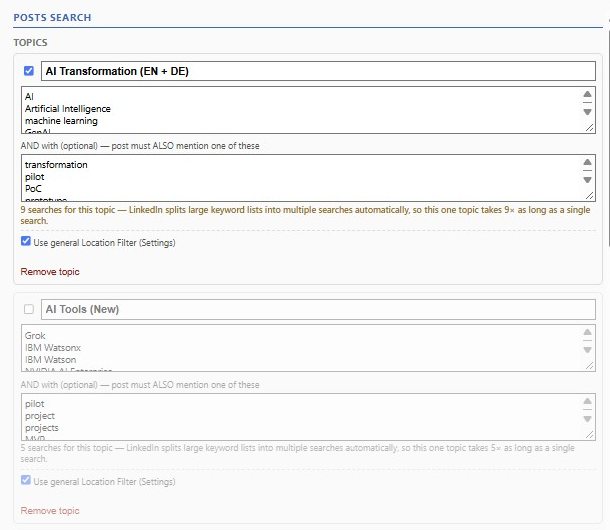
Watch LinkedIn for buying signals
Define topics once, then scan LinkedIn posts and job listings for all of them in one go, scoped to the accounts you care about.
- Topics with optional AND terms, and negative topics for recruiters and competitors
- Merged, de-duplicated, ranked results with matched keywords and hiring signals
- Pipeline dashboard: status charts, sortable table, follow-up dates, CSV export
- Bulk status changes with a confirmation step and one-level undo
An AI sales team that knows your pipeline
Three assistants, all optional, all using your own Anthropic API key so the cost stays in your hands.
- Sales Mentor: ask which lead to approach first, or for strategy advice
- Customer Voice: a realistic buyer to pressure-test a message before you send it
- Message drafting: openers you edit and copy yourself; nothing is auto-sent
- Cost tracking per feature, and a warning before an expensive action
Built to be used carefully
SalesTeam is aware of the restrictions that platforms such as LinkedIn place on data collection, and is designed for your own personal use of the data. These are the safeguards built in:
You start it, you see it
Every scan starts when you click a button. Every search and page visit happens in a browser tab you can watch, and your browser stays open while it runs.
No hidden automation
There are no scheduled scan jobs and no mass page collection. When you close your browser, SalesTeam stops.
A daily limit
A built-in safety mechanism limits the number of searches and page visits per day, and stops a run when the limit is reached.
Your data stays yours
Everything is stored in your browser. SalesTeam has no server of its own and never resells or shares your data.
No messages sent for you
SalesTeam drafts; you decide. It never sends messages, connection requests or comments on your behalf.
One batch at a time
Only one batch process runs at once, and confirmations, cost estimates and undo protect you from accidents.
HubSpot
Import and export by file
AvailableExcel / CSV
Import and export
AvailableAnthropic Claude
Your own API key
AvailableOther CRMs
Planned
SoonWorks with the tools you already use
SalesTeam is built to fit around your CRM and your spreadsheets, not to replace them.
- HubSpot: export companies and contacts as files HubSpot imports; import a HubSpot export to add accounts
- Excel and CSV: import a research workbook, export leads and accounts
- Anthropic Claude: bring your own API key for the AI features and web research
- Backup and restore to a folder on your computer; automatic daily backups if you want them
- More CRM integrations are planned
Start finding your next customers
Free during early access. Installs in a minute. Your data stays in your browser.